From a PyTorch Demo to a TensorRT Engine
A practical path for converting a working demo model into ONNX and then building a TensorRT engine for faster GPU inference.
TL;DR
- Export a validated PyTorch model to ONNX before building a TensorRT engine.
- TensorRT can improve GPU inference through graph optimization, kernel selection, and FP16 or INT8 execution.
- Validate accuracy and benchmark the complete request path before deployment; performance gains do not automatically justify precision changes.
When TensorRT Makes Sense
A trained model running in a notebook is a good starting point, but production inference has different requirements. Requests arrive continuously, latency must remain predictable, and GPU utilization must be efficient.
While working on an AI application at my company, I started with a demo model that worked correctly but was too slow for real usage. The first improvement was to move from PyTorch inference to ONNX. This made the model easier to deploy, but it was only one step in the optimization journey.
The next step was TensorRT.
TensorRT does not change the trained model weights or retrain the network. It builds an optimized inference engine for a specific NVIDIA GPU and TensorRT environment. It can combine operations, select efficient kernels, and use reduced precision such as FP16 or INT8 when accuracy remains acceptable.
PyTorch to ONNX
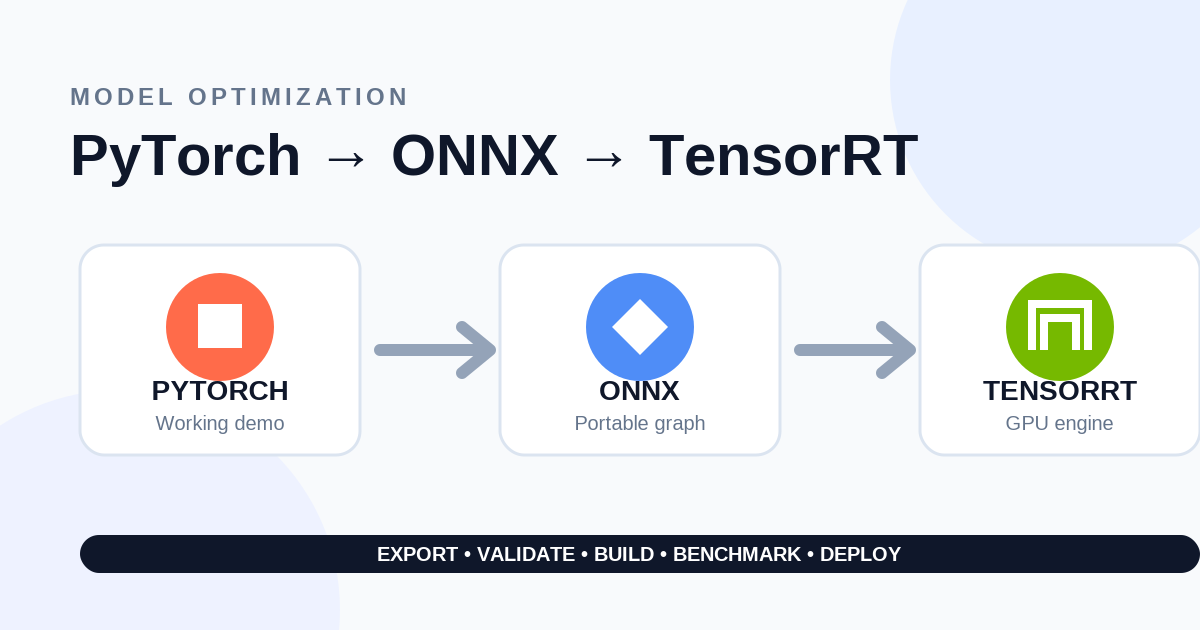
A typical inference optimization pipeline looks like this:
PyTorch / TensorFlow model
            ↓ export
           ONNX
            ↓ validation
          ONNX Runtime
            ↓ build and optimize
      TensorRT engine (.engine)
            ↓
      Production inference
Every step should be validated. Optimizing a model that produces incorrect outputs is not useful.
Export the model to ONNX
ONNX provides a portable intermediate representation for inference engines. For a PyTorch model, export with a representative input shape and a supported operator set.
import torch

model = model.eval().cuda()
dummy_input = torch.randn(1, 3, 640, 640, device="cuda")

torch.onnx.export(
    model,
    dummy_input,
    "model.onnx",
    input_names=["images"],
    output_names=["output"],
    dynamic_axes={
        "images": {0: "batch_size"},
        "output": {0: "batch_size"},
    },
    opset_version=17,
    do_constant_folding=True,
)
Dynamic batch support is useful when the service may receive different batch sizes. Use fixed shapes only when the production workload has a known, fixed shape.
Validate the ONNX model
Before building TensorRT, verify that the ONNX graph is valid and behaves like the original model.
import numpy as np
import onnx
import onnxruntime as ort
import torch

onnx_model = onnx.load("model.onnx")
onnx.checker.check_model(onnx_model)

session = ort.InferenceSession(
    "model.onnx",
    providers=["CUDAExecutionProvider"],
)

sample = np.random.randn(1, 3, 640, 640).astype(np.float32)
onnx_output = session.run(None, {"images": sample})[0]

with torch.no_grad():
    pytorch_output = model(torch.from_numpy(sample).cuda()).cpu().numpy()

max_error = np.max(np.abs(onnx_output - pytorch_output))
print(f"Maximum absolute difference: {max_error:.6f}")
The correct tolerance depends on the model. For a classification model, confirm that labels and confidence values remain stable. For object detection or segmentation, compare coordinates and mask quality, not only the final output shape.
Also use a few real inputs rather than only random tensors. Edge cases often reveal unsupported operators or shape assumptions.
Building the TensorRT Engine
TensorRT can build an engine from ONNX using its Python API or the trtexec command-line tool. The command-line tool is useful for quick experiments.
trtexec \
  --onnx=model.onnx \
  --saveEngine=model.engine \
  --fp16 \
  --workspace=2048 \
  --verbose
FP16 is often a practical first optimization because it usually provides lower latency and memory usage than FP32. It does not automatically guarantee that every model’s accuracy remains acceptable, so validation is required.
TensorRT can also build engines with:
- Dynamic batch sizes or dynamic input dimensions
- INT8 quantization with a calibration dataset
- Different optimization profiles for production workloads
- FP8 on supported NVIDIA GPUs and TensorRT versions
Dynamic shapes
If ONNX input dimensions vary, the TensorRT builder needs a range of supported shapes.
Minimum: 1 x 3 x 640 x 640
Optimal: 4 x 3 x 640 x 640
Maximum: 8 x 3 x 640 x 640
Shape selection affects performance. An engine optimized for one batch size may be less efficient when serving another batch size.
The best approach is to profile the actual production traffic before selecting the optimization profile.
FP16 and INT8
INT8 can significantly improve throughput on GPUs that support it efficiently, but it introduces an additional accuracy risk.
TensorRT needs a calibration dataset to estimate how activations should be quantized. The calibration inputs should represent the data seen in production.
Compile FP32 engine
        ↓
Validate accuracy
        ↓
Build FP16 engine
        ↓
Validate accuracy
        ↓
Collect representative data
        ↓
Build INT8 engine
        ↓
Compare accuracy and latency
FP16 or INT8 should not be chosen because of a benchmark alone. The model should also pass an accuracy test under representative inputs.
Accuracy Validation
Compare outputs from PyTorch, ONNX Runtime, and TensorRT using representative inputs. Check errors, labels, confidence values, bounding boxes, masks, or application-specific acceptance criteria rather than relying only on model output shape.
Latency Benchmarking
A valid benchmark avoids common mistakes:
- Warm up the engine before recording latency
- Use enough iterations to reduce noise
- Report the 50th and 95th percentile, not only the average
- Include preprocessing and postprocessing if users experience them
- Use the same input, batch size, and GPU for comparisons
- Test one engine configuration at a time
A simple benchmark sequence is:
1. Warm up
2. Run FP32 ONNX or TensorRT baseline
3. Run FP16 TensorRT
4. Run INT8 TensorRT, if valid
5. Repeat multiple times
6. Compare p50, p95, throughput, and accuracy
GPU timing can be misleading if CPU-side synchronization is placed in the wrong position. TensorRT and CUDA operations are asynchronous, so use CUDA events or synchronize measurements correctly.
Deployment and Operations
TensorRT engine portability
A TensorRT engine is not automatically portable.
The engine may be specific to:
- The GPU architecture
- The TensorRT version
- The CUDA environment
- The selected precision and optimization profile
For this reason, build engines during deployment or in a controlled container image for the target hardware. Do not assume that a .engine file generated on one machine will perform reliably on another.
Keeping the ONNX model as a source artifact also makes rebuilding and debugging easier.
Limitations
Common problems
Unsupported ONNX operator
Check the TensorRT version’s supported operators. Update ONNX export, replace the unsupported operation, or use a supported custom implementation.
Large accuracy difference after conversion
Validate data types, preprocessing, normalization, output layout, and unsupported operators. Compare layer or intermediate outputs if possible.
Slow first inference
The engine may still be initializing or CUDA kernels may need to warm up. Preprocess warm-up inputs before measuring normal requests.
Dynamic shape overhead
TensorRT may compile or optimize different shape configurations at runtime. Use one optimization profile and keep production shape values as close as possible to the optimal dimensions.
Engine build but low GPU utilization
The bottleneck may be CPU preprocessing, memory transfers, synchronization, or request batching rather than the engine itself.
When TensorRT is not the answer
TensorRT is valuable for NVIDIA GPU inference, especially for repeated, production workloads. It is not a replacement for:
- Fixing a slow data pipeline
- Reducing network transfer overhead
- Improving queueing and batching
- Removing unnecessary preprocessing
- Choosing the correct batch size
- Fixing an inefficient model architecture
If preprocessing takes 40 ms and the model takes 5 ms, optimizing the model alone will not remove most of the latency.
Final Recommendation
Converting a demo into a production model is not a single export command. It is a pipeline:
Working model
→ ONNX export
→ numerical validation
→ TensorRT engine build
→ precision and shape testing
→ deployment and continuous benchmarking
ONNX made my company’s demo easier to standardize, but TensorRT was the step that focused on NVIDIA GPU execution efficiency. The important principle is to optimize iteratively and validate every stage.
The fastest engine is only useful if it returns the same results the application expects, runs on the target hardware, and improves real user latency.